Most return policies are written once and enforced by whoever is standing at the counter. The sign says thirty days. The customer is at day forty, polite, and holding the bag. The cashier has a line behind them and no way to reach the owner, so the return goes through, and the policy becomes a suggestion.
A policy holds when the register does the remembering: it knows the sale date, it knows the window, and it hands the exceptions to someone who is allowed to make them. Here is how to set that up.
Pick a window and print it on the receipt
Choose how many days a customer has to bring something back. Omni starts at 30, and you can set any number, or 0 for no limit. Every receipt then prints the window at the bottom, so the customer leaves already knowing the rule and nobody has to recite it during an argument.
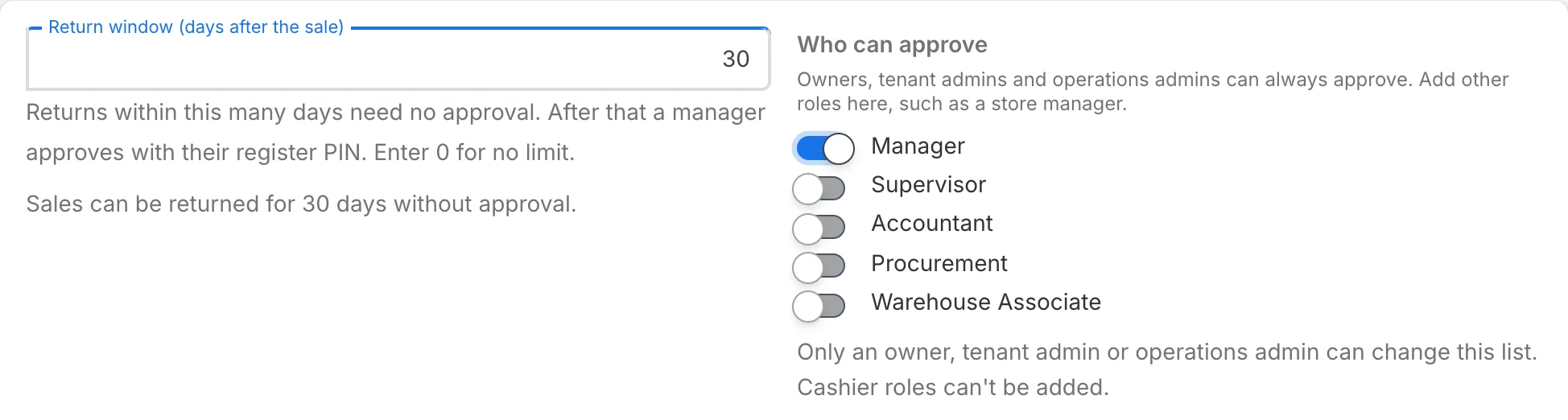
Inside the window, a return needs no approval. The cashier finds the sale, picks the items, and the refund goes back to the payment the customer used, up to what that payment took.
Late returns go to a manager, at the counter
Past the window, the register asks for a manager. The manager types their register PIN on the spot, and the approval covers those items at that amount, once, for the next two minutes. It cannot be saved up for the next customer. A cashier role can never approve, so every exception is a second person's decision.
Who counts as a manager is your call. Owners and admins can always approve, and you can add roles such as a store lead. Each approver sets their own PIN in their account settings.
Ask why every item comes back
The register and the back office ask the same question on every return: why is it coming back? The list Omni starts you with fits your trade, so an apparel shop sees choices like size and fit, and a repair business sees choices like a part that turned out to be unneeded. You can switch reasons off or add your own, and picking Other asks for a note.
A month of reasons is worth more than any single return. When one product keeps coming back for the same reason, that is a supplier conversation, a description to rewrite, or a size chart to fix. The reasons appear on the refund report, ready to sort.
Returns without a receipt
A customer with no receipt is the return that worries owners most, because there is no sale to check against. Omni handles it with three rules. A manager approves every one. The value goes to store credit on a customer or onto a gift card, rather than back as cash or a card refund. And the amount starts at the lowest price the item sold for in the last 90 days, which the cashier can adjust.
Every one of them lands on the No-receipt Returns report: the store, the cashier who asked, the manager who approved, the customer and the amount. A name next to every approval does most of the work a hard cap would, without turning away the customer who simply lost the slip.
Exchanges, and what goes back on the shelf
When a customer wants a different size or color, ring it as an exchange: the returned items come back, the new ones go out, and the customer pays only the difference.
Returned items go back into stock at the store taking the return. When something comes back damaged, the cashier ticks "Damaged, don't put back on the shelf", and it stays out of the count you sell from.
Gift receipts and the sale from last Tuesday
A gift receipt prints the items without prices and carries the exchange line, so the person who received the gift can bring it back without seeing what it cost. If the buyer asks for one later, the Receipts button at the register finds the earlier sale and reprints it, prints a gift receipt, or emails it.
Putting it together
- Set the window, and let the receipt carry it
- Decide which roles approve, and have each approver set a PIN
- Review the reason list for your trade and add the ones you hear most
- Read the No-receipt Returns report weekly, by store and by approver
- Check the reasons on the refund report monthly for products that keep coming back
Returns, exchanges, gift receipts and both reports come with the register on every Omni plan. The help center covers each screen under Returns & Refunds.