Is Omni the right Jewel360 alternative for your jewelry store?
Omni runs the whole jewelry operation on one record, from appraisals and repairs to purchasing, AR/AP and trade accounts, at one published price.
The main differences between Omni and Jewel360
Both run a jewelry counter: sales, stock, appraisals, repairs and a customer history that follows the person. The choice comes down to what sits behind the counter, and who you process card payments with.
Jewel360 is a point of sale built for jewelers, with one tier published, the rest quoted, and a setup fee rebated when you process payments with them. Omni runs the counter and the business behind it on one record: the ring on the bench, the appraisal, the purchase order for more chain and the trade account's invoice all belong to the same customer and the same stock. Every plan is priced on the page, and your processor is yours to choose.
Why stores choose Omni over Jewel360
Repairs and appraisals live on the customer's record
Take a ring in for a resize, note the worn prongs and get the customer's signature before anyone touches it. The job, its appraisal and every past visit sit on that customer's record, so the next person at the counter sees the whole story. Repairs start on Grow and appraisals on Scale.
Customers check a repair themselves
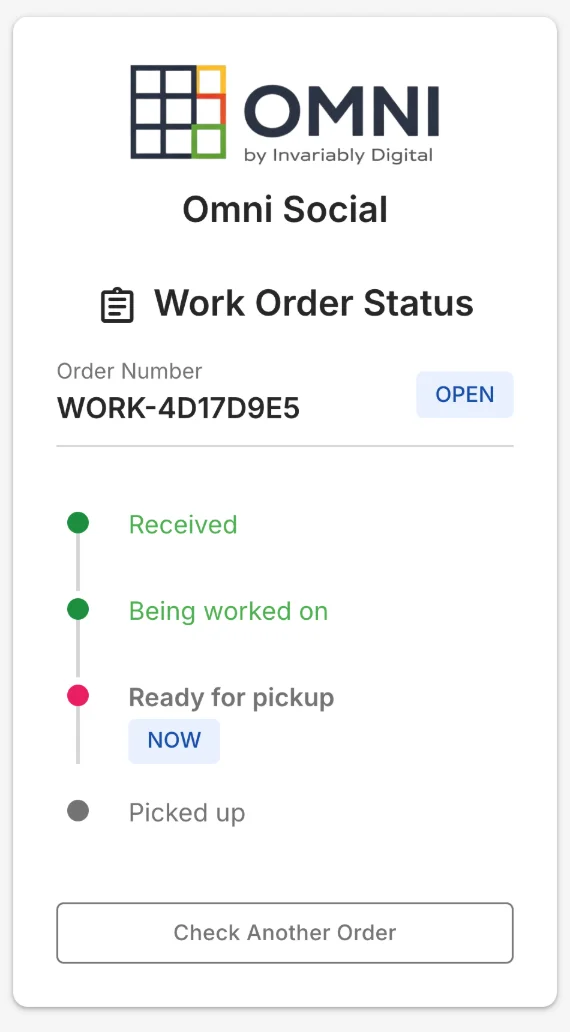
The claim ticket carries a QR code, and the customer follows four plain stages online: received, being worked on, ready for pickup, picked up. It comes with repairs on Grow once you switch on online status.
Reorder studs and chains from the same screen
When a staple runs low, Omni works out how many to order and drafts the purchase order with the supplier already on it. The piece you receive lands on the same item you sell, and the supplier's invoice is recorded beside it. Purchasing and supplier bills start on Grow.
Trade accounts order on their own
A designer or another store that buys from you wholesale logs into your portal, sees their own prices and places the order without a call. It draws on the same stock as your counter. The portal and wholesale pricing are on Power and Elite.
Every plan has its price on the page
The four main plans are published, from $99 to $699 a month, with your users included and no setup fee. Appraisals come in on Scale at $399, so you can see what the jewelry tools cost before you talk to anyone.
Pricing compared
Omni
Flat-rate, with every tier published. Four plans from $99 to $699 per month, plus a custom-priced Elite tier. Your plan includes its seats at no extra charge, there is no setup fee, and the free trial takes no credit card.
Jewel360
Jewel360 publishes its Startup tier at $299 per month, or $199 per month billed annually. Core and Plus are quoted through a pricing form rather than listed. A $750 setup fee covers data migration and configuration, and is rebated in full once you go live and process payments through Jewel360. (See Jewel360 for current rates.)
Independence
Your money, your data, your domain
Choosing a payment processor stays a decision you make on its own merits, because nothing in Omni's price depends on it. We charge for software, take no share of a sale, and keep your appraisals, repairs and customer history behind an export button rather than a support request.
Feature comparison
| Capability | Omni | Jewel360 |
|---|---|---|
| Flat pricing — no per-user or per-register fees | check | remove |
| Point of sale (POS) | check | check |
| Inventory management | check | check |
| Order processing | check | check |
| Jewelry appraisals | check | check |
| Repairs & custom work orders | check | check |
| CRM & customer pipeline | check | check |
| Purchasing & vendor management | check | close |
| AR / AP billing & accounting | check | close |
| Fulfillment / warehouse management (WMS) | check | close |
| B2B customer portal | check | close |
| Workflow automation | check | remove |
| AI on every plan | check | remove |
| Integrates with your existing storefront & accounting | check | check |
| Jewelry trade integrations (Stuller, Geller’s, Jewelers Mutual) | close | check |
Accurate to what Omni ships today. Some rows start on a higher plan, such as the Shopify and live QuickBooks or Xero syncs on Power, and the pricing page shows each one.
Where each fits best
Choose Omni if…
You want the whole operation on one record: appraisals and repairs alongside purchasing, AR/AP, stock across locations, a B2B portal for trade accounts, and a flat price you can read off a page before you talk to anyone.
Choose Jewel360 if…
You need the jewelry trade integrations for sourcing, valuation and insurance more than you need purchasing, AR/AP, warehouse management or a B2B portal.
Switching to Omni from Jewel360
Bring your items, customers and open jobs in with Omni’s guided import, keep your storefront and accounting where they are, and connect your own Stripe, Square or Authorize.Net account so payments settle straight to your bank. Your data leaves the same way it arrived: CSV, from a button on the page.
Frequently asked questions
Is Omni a good Jewel360 alternative?
For jewelers who need more than the counter, yes. Omni covers appraisals and repair work orders, and adds purchasing, AR/AP, warehouse management and a B2B portal on the same record, at one flat published price.
Does Omni handle appraisals and repairs?
Yes. Appraisals are included from the Scale plan, and repairs and custom work run as work orders with their own steps, so a piece on the bench has the same status trail as any other job.
Does Omni connect to Stuller or Geller’s Blue Book?
No. Omni takes card payments through Stripe, Square or Authorize.Net on every plan and exports your books as CSV for QuickBooks or Xero. Shopify and the live QuickBooks or Xero connection sync from the Power plan, and supplier catalogs import as CSV from Scale.
Who processes my card payments?
You do, through your own Stripe, Square or Authorize.Net account, settling straight to your bank. Omni charges for software and takes no share of a sale, so choosing a processor stays a decision you make on its own merits.