Every store has a version of the same last ten minutes. The lights are half off, someone is counting twenties on the counter, and the total lands close to what the report says, or close enough. Close enough is where cash goes missing slowly, because a drawer that is off by a few dollars every night never looks like a problem on any single night.
A good close turns that count into a number you can act on. It takes the same ten minutes. What changes is the order you do things in and what you keep afterward.
Count before you see the answer
Have the cashier count the drawer and enter the total before the register shows what it expected. In Omni the close screen says exactly that: count first, and the expected figure appears once you submit. A count made while looking at the target drifts toward the target, usually without anyone meaning it to. A blind count tells you what is actually in the drawer.
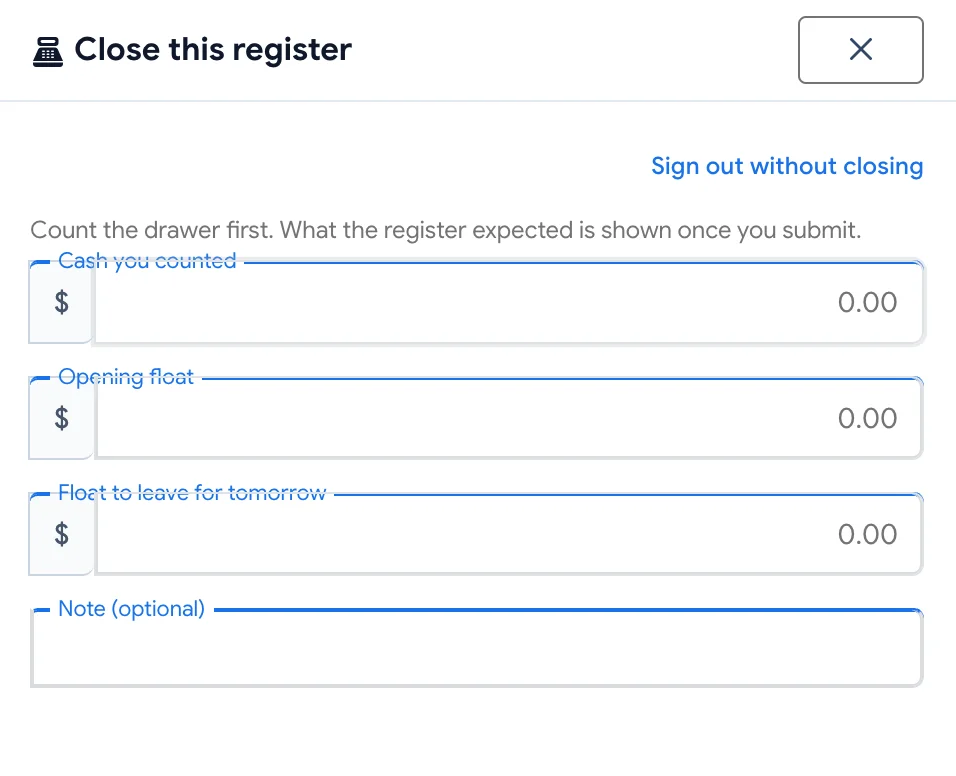
One total is enough. Omni asks for the cash counted as a single figure, so the cashier counts however they are used to counting and enters the sum.
What the drawer should be holding
The expected figure is simple once you see its parts: the float the drawer started the day with, plus the cash taken at that register, minus any cash refunds. Card, gift card, check and store credit payments are part of the day's takings, but none of that money ever sat in the drawer, so it stays out of the count.
The opening float carries over from the previous night's close. If someone changes it, Omni keeps a note that it was changed, so a float that grew or shrank overnight does not vanish into the difference.
Bank the rest, leave tomorrow's float
After the count, the cashier sees the opening float, the cash taken, what the drawer should hold, what they counted, and the difference. They enter the float to leave for tomorrow, and Omni shows how much to take out to bank. That figure is what goes in the deposit bag, so the bank deposit and the close agree from the start.
When a difference is worth a phone call
A dollar short on a busy Saturday is a rounding story. Forty dollars short is a conversation. You decide where that line sits: set the amount in settings, and when a close-out's difference goes past it, over or short, the people who can correct close-outs at that store get an alert in Omni. Small differences stay in the history without waking anyone up.
Fixing a count without erasing it
Sometimes the count was wrong rather than the drawer: a bundle of fives counted twice, a deposit bag set aside early. A manager can record a correction against a signed close-out. The original stays on the record beside it and both are logged, so the history shows what was counted, what it was corrected to, and who did it. Each close-out takes one correction, which keeps the record from turning into a running edit.
The till somebody left open
Shifts end in a hurry, and now and then a drawer is still open in the morning. A manager with access to the close-out history can close it the next day: pick the store, the register and the day, and Omni shows the takings by payment type and what the drawer should hold before they count. The cashier's own close at the register stays a blind count. The manager's close is the cleanup after the fact.
Closing a day with no register
Plenty of shops take money without ringing a register every day: a sale entered in the back office, a deposit taken at a desk. Those takings still need signing off. The cashier chooses to close only the counter takings for the store, and the day's money is closed the same way as a register's, with nothing left floating between days.
A nightly checklist
- Count the drawer and enter the total before looking at any report
- Read the difference, and note a reason when it is more than small change
- Set tomorrow's float and bag the amount shown to bank
- Keep paid-outs and petty cash in their own envelope, since the drawer count covers sales and refunds
- Once a week, read the close-out history for patterns: the same register, the same shift, the same direction
Close-out comes with the register on every Omni plan. The help center walks through each screen under Closing the Till at the End of the Day.